Guide · Basics
What is a PMV maker?
A PMV maker is software for turning a set of clips and a music track into a porn music video. The category runs on a spectrum, from general-purpose video editors driven with a lot of patience at one end to purpose-built samplers that read the beat grid from the track and place clips onto it for you at the other. People look for the purpose-built end for a simple reason: spend less of the night placing cuts by hand and more of it watching an edit shaped around the song.
One disambiguation before anything else: PMV here means porn music video. The pony fandom uses the same three letters for its own music videos, and search results mix the two freely. This page covers the adult category, and it covers it properly: what the job actually decomposes into, why hand editing and samplers price that job so differently, and the five questions that let you evaluate any tool in the field, including ones that don't exist yet.
The genre, first
A PMV cuts adult clips to music the way a music video cuts film: rhythm-matched, escalating, built to carry you somewhere. Cockhero is its interactive cousin, beat-synced stroke instructions that turn watching into a game with rounds, ramps, and a finish line. Hypno leans on captions, loops, and repetition. All three share one spine: the edit follows the music, and the session follows an intensity arc.
That spine is why "PMV maker" names a real category. A tool that only helps you cut video solves half the job. The other half is the session: the arc that decides what plays when, the overlays that make it interactive, the escalation the genre exists for. Every requirement in the next section falls out of that one sentence, which is why the same five things keep showing up no matter who builds the tool.
What a PMV maker actually does
Whatever the tool, the job decomposes into five primitives. A real PMV maker supplies all five as things you can see and manipulate. Anything less, and you're supplying the missing ones yourself.
- Library. Hold your clips in a form the editor can search: tagged by performer, act, framing, and energy, cut into usable 5 to 20 second ranges. Those four tag axes are what the arc's phases will query when the session gets built. The clip sourcing guide covers stocking one.
- Beat grid. Know where the beats and bar starts actually sit in the track, so every cut can snap to them instead of landing nearby. The grid prevents the tell that sinks most first edits: cuts that drift a few frames off the beat and read as sloppy from the first playthrough. Bar starts matter as much as beats, because phase changes and drops belong on them, not near them.
- Arc. Structure the session in phases (soft, medium, hard, edge, climax) that decide which tags play and how fast the cuts come. An arc is not a playlist. A playlist is an order of clips. An arc is the set of rules that generates the order: this phase pulls tease material at half-tempo, that one rides the track's peak at full cut rate. Change the rule and the whole stretch re-derives.
- Overlay layer. Captions, countdowns, edge holds, and a stroke meter, timed to the same grid as the cuts. Overlays are what turn a music video into a session.
- Render. Produce one file with everything burned in, meter included, so the session plays anywhere an MP4 plays. No player plugins, no companion app, no second screen.
- Library
- Tool suppliesA searchable, tagged clip library
- If it does notCut, tag, and find every range yourself
- Beat grid
- Tool suppliesDetected beats and bar starts
- If it does notMap and check the timing yourself
- Arc
- Tool suppliesPhases that query tags and change cut rate
- If it does notPlan the sequence and pacing yourself
- Overlay layer
- Tool suppliesCaptions, countdowns, edge holds, and a meter
- If it does notBuild and retime overlays separately
- Render
- Tool suppliesOne playable file with every layer included
- If it does notAssemble and export the final file yourself
There's a landscape claim hiding in that list. A general-purpose editor gives you the timeline and nothing else: you supply the grid, the arc, and the discipline by hand. A purpose-built maker supplies those as primitives. That difference is what the name is worth, and it's the line that separates the two ends of the spectrum this page opened with.
Hand editing vs samplers
Hand editing gives you exact control and charges you exactly that. Run the arithmetic once. A 9-minute session at 140 bpm carries roughly 1,260 beats. You won't cut on every one, but cut on every fourth beat on average and you're past 300 cut points, every one of them yours to place and yours to check. Phase changes, caption timings, and edge holds only push the count higher. Editors who work this way describe the workflow in hours per finished minute, and the arithmetic backs them up.
Hand editing still earns that cost in one case: the one-off showpiece where every cut is a decision you want to make yourself, framing chosen shot by shot against the arrangement. If that's the project, a general-purpose editor and patience is a legitimate answer. The problem is everything else: the second session, the fifth, the one you want to build around a track you found this morning.
A sampler inverts the process. Instead of an empty timeline, it proposes a complete session from your library and your arc, every cut on the grid by construction, and you react to the proposal. The craft moves from placing clips to directing them: pin the stretch that works, re-roll the one that doesn't, trim where the machine guessed wrong. Placing is deciding everything. Directing is deciding what matters. The appeal is not that the decisions disappear. It is that you spend less time placing every boundary and more time on the decisions that change the session.
The catch to watch for is samplers that generate and stop. If you can't open the proposal and adjust one cut without regenerating the rest, the tool has traded one frustration for another. A sampler is more useful when its proposal opens on a real timeline, because automation should not cost you precise control over the result. Either way, the how-to guide walks the full workflow end to end.
One adjacent meaning deserves a sentence: "PMV creator" also describes people, editors who take commissions, and hiring one means paying for their taste and waiting on their hours.
The tools in the field
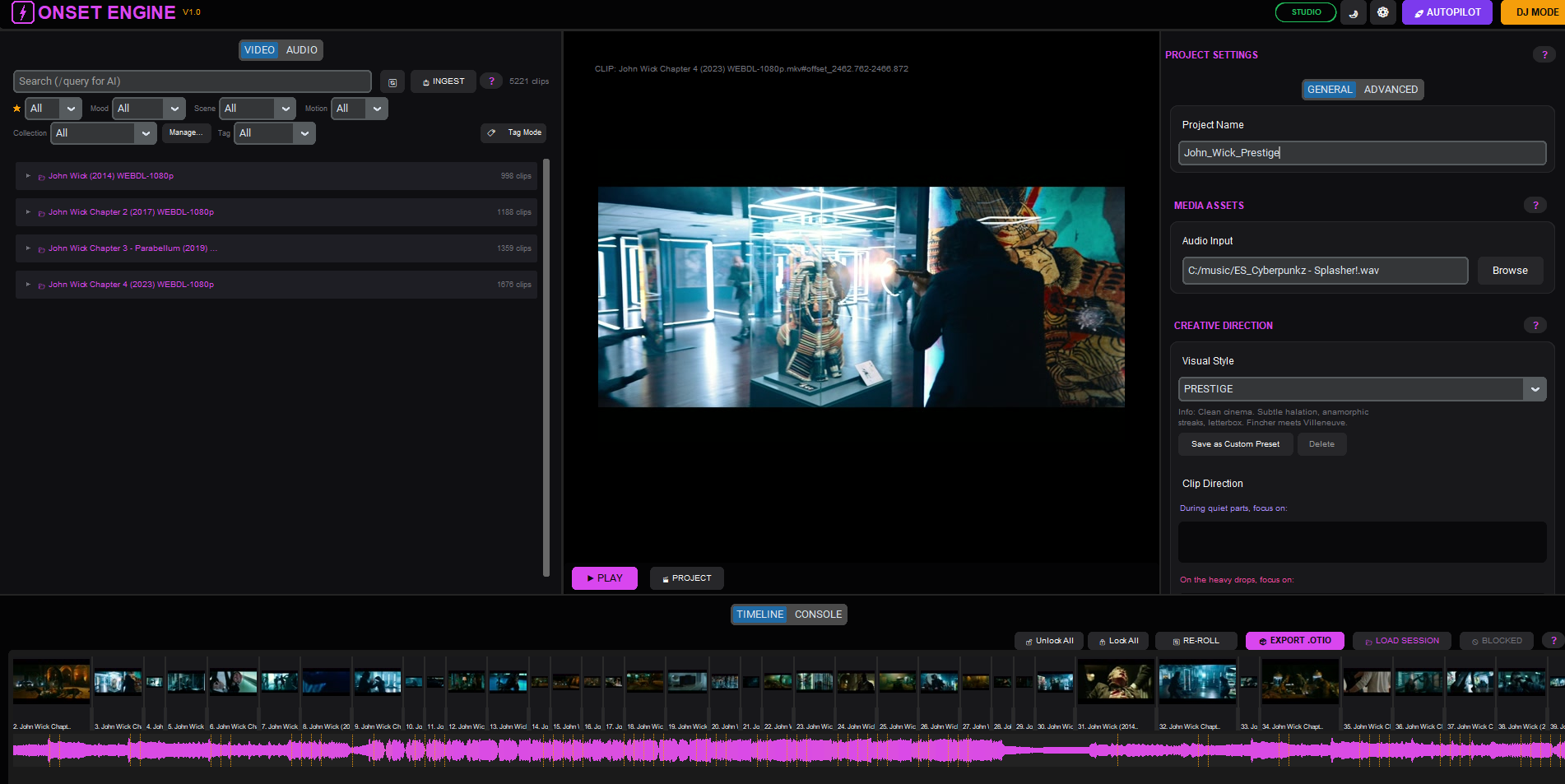
Onset Engine is a paid, local-first montage editor that can turn a folder of clips and a music track into a beat-synced edit, with manual controls when you want to refine the result.
PMV Director is a community-built PMV tool developed publicly on Milovana, with beat analysis, a visual timeline, and MP4 or OTIO export. Older community projects such as AutoPMVs can automate PMV generation too, though the local setup asks you to install and configure Python, FFmpeg, and other dependencies yourself.
These are real ways to make the process easier now. We still wish the process were more fun and less complicated. That is why we are building Kira around the session itself: arcs, phases, and tag-driven assembly that can turn your own library into something fresh without asking you to make every decision. Kira is under development, so this is the direction, not a tool you can use today.
This page describes the field rather than ranking it. The questions below are how you evaluate any of these approaches, and any tool that ships after this page was written.
What to look for
Five questions separate the tools, and the answers locate any PMV maker on the spectrum: how much of the job it supplies as primitives, and how much it quietly leaves to your patience.
- Where does the beat grid come from? A grid derived from detected beats can follow the track itself. A manually entered BPM can still work for a steady track, but it needs checking anywhere the tempo drifts.
- Is the arc a first-class object? Phases with tag filters and tempo curves mean the tool understands sessions. If you're coloring a flat timeline by hand, it doesn't.
- Are captions, countdowns, and edge holds primitives? Built-in overlays are easier to keep on the same grid as the cuts. A separate text tool can do the job, but every timing change becomes another manual pass.
- Can you preserve the parts that work? Whether the button says pin, lock, or something else, check what happens when you regenerate. A useful tool changes the stretch you rejected without throwing away the decisions you already made.
- Where do your clips go? Check where the tool stores and renders your media, whether any files leave your machine, and what its current privacy documentation actually promises. The answer matters more here than it would in an ordinary video project.
Sources
- Onset Engine: official product page (onsetengine.com)
- Onset Engine: official press kit and product screenshots (onsetengine.com)
- PMV Director: creator's release thread on Milovana (milovana.com)
- AutoPMVs: official GitHub repository (github.com)